Archive for September, 2008

200th Freelang dictionary

Sunday, September 14th, 2008

We are happy to announce that we’ve just uploaded our 200th dictionary on Freelang! It is a Cherokee-English dictionary, made by Shawn Greene. I would like to thank all the authors for their precious contributions, especially Renato B. Figueiredo, who contributed for 108 dictionaries in less than two years, but also Charles Lippert for maintaining the Ojibwe dictionary, Alexis B. Lemos for his Brazilian Portuguese dictionary, Holger Terkelsen for the Danish dictionary, and Jon McKenna and Shelly Daum for their regular updates of the Afrikaans and Norwegian dictionaries.

There are about 6,000 languages on Earth, so our mission to help preserving cultural diversity is only beginning!

Precision about the new installation routine

Wednesday, September 10th, 2008

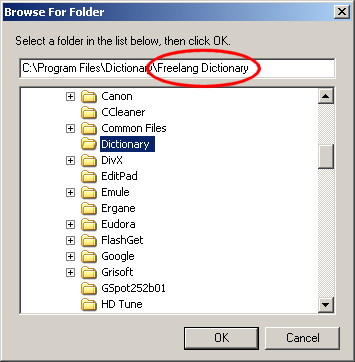
It seems that the new installation process of the Freelang dictionary is working fine. We’ve only had two or three emails reporting problems so far, and we are trying to solve them. We would like to remind our users, though, that the program and the wordlists must be installed in the same destination folder. If you had installed our dictionary before, then it is probably installed in C:\Program Files\Dictionary. But the new installer suggests a new path (for sake of compatibility with Windows Vista), which ends by “Freelang Dictionary”. Therefore, if you wish to download an updated wordlist in the old folder, you have to select “Program Files”, then “Dictionary”, but you also have to delete “Freelang Dictionary” if it is automatically appended to the path by the installer.

Thank you for your patience and please feel free to contact us if you need any help.

Freelang Dictionary: new installation routine

Sunday, September 7th, 2008

We have changed the way the dictionary installs itself on a computer, and we are happy to announce that it is now 100% compatible with Windows Vista. There is also an uninstall option, so if you want to remove Freelang dictionary from your system, you can do it by using the Add/remove programs option in Windows Control panel.

In the case of dictionaries using special fonts, like Armenian, Esperanto, Macedonian or Vietnamese, the fonts are now installed automatically.

It is only the installation that has been modified, not the program itself. So if you already downloaded and installed the program, you don’t need to do it again. If you are using Vista and experiencing trouble, though, like you can’t reverse the word lists, we recommend that you download the new installation files.

The dictionary updates will now resume normally. I would like to thank the authors for their patience, especially Renato Figueiredo. Many thanks also to Jordan Russell for developing Inno Setup Compiler and keeping it free and alive.